How does ReputoNode work?
ReputoNode is a social platform built around topic-specific reputation. The goal is not to earn one overall score or to measure popularity by follower count. You may have a high Reputation in one field while only getting started in another.
This guide explains the most important rules governing how ReputoNode works. Detailed rules for using the Portal are set out in the Terms of Service and Community Standards.
1. Choose a Post Type
Every Post has one of four Types. Choose the one that best describes what you are publishing.
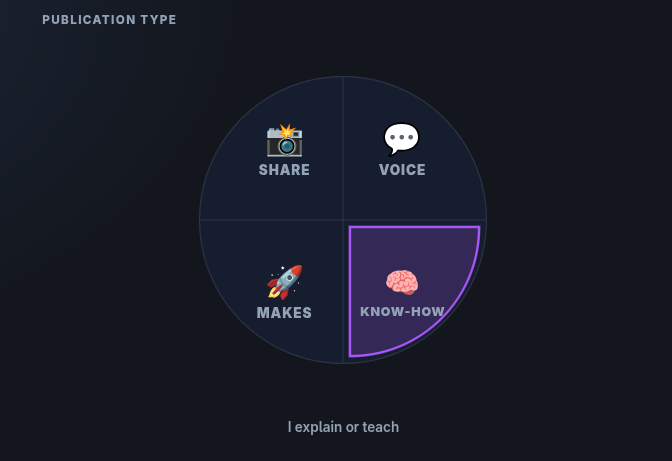
- KNOW-HOW 🧠 — when you explain, teach or show how to do something.
- MAKES 🚀 — when you present something you made, built or created.
- VOICE 💬 — when you ask a question, comment or present your own opinion.
- SHARE 📸 — when you share something you saw, found or experienced.
The Post Type also matters for Reputation. Content focused on sharing knowledge or presenting your own work may affect it differently from opinions or shared material. This allows ReputoNode to treat different kinds of publications differently.
2. Choose a Category
Every Post belongs to one Category. The Category determines the field in which the author's Reputation is assessed.

The following Categories are currently available in ReputoNode:
- 💻 Digital & IT
- 🧪 Science & Discoveries
- 🏠 Home & Everyday Life
- 🎨 Art & Aesthetics
- 💼 Business & Career
- ⚙️ Technology & Engineering
- 👗 Style & Beauty
- 🧍 People & Health
- 🎬 Entertainment & Pop Culture
- 👥 Society & Media
- 🌍 Facts & Events
- ✈️ Travel & Places
- 🌿 Nature & Planet
- 📜 History & Biographies
- 🧘 Philosophy & Religion
- 🍽️ Food & Drinks
If you publish instructions for repairing a chair, a natural Category may be “Home & Everyday Life”. If you describe an electronics project you built yourself, “Technology & Engineering” may be more appropriate.
Choose the Category according to the actual subject of the Content — not according to where you already have the highest Reputation.
3. Build a Post
A Post may contain text, images, videos and links. Elements can be arranged in blocks and their width can be adjusted. You can also add hashtags and specify a Location — from a specific place up to a global scope.
If the Post is not ready yet, you can save it as a draft and return to editing later. Publishing requires a title, Post Type, Category and at least one Content element.
A Location does not have to mean an exact address. You can indicate a specific place, area, city, region, country or continent, or leave the Post as global. Choose a level of precision that makes sense for the Content and does not reveal more information than you want to make public.
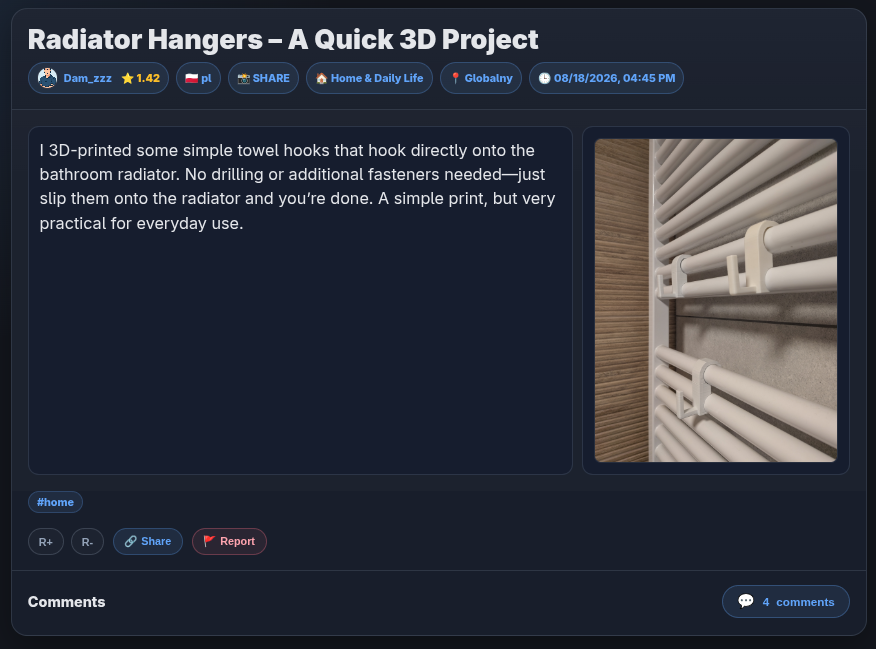
In the Post header, other users may see, among other things:
- the author,
- the author's score in the Category of that Post,
- the original language,
- the Post Type,
- the Category,
- the Location,
- the publication date.
ReputoNode is multilingual. The original language is displayed with Content, and the Portal may present available language versions according to the selected interface language.
4. R+ and R− affect topic-specific Reputation
Posts, Comments and Replies include R+ and R− reactions.
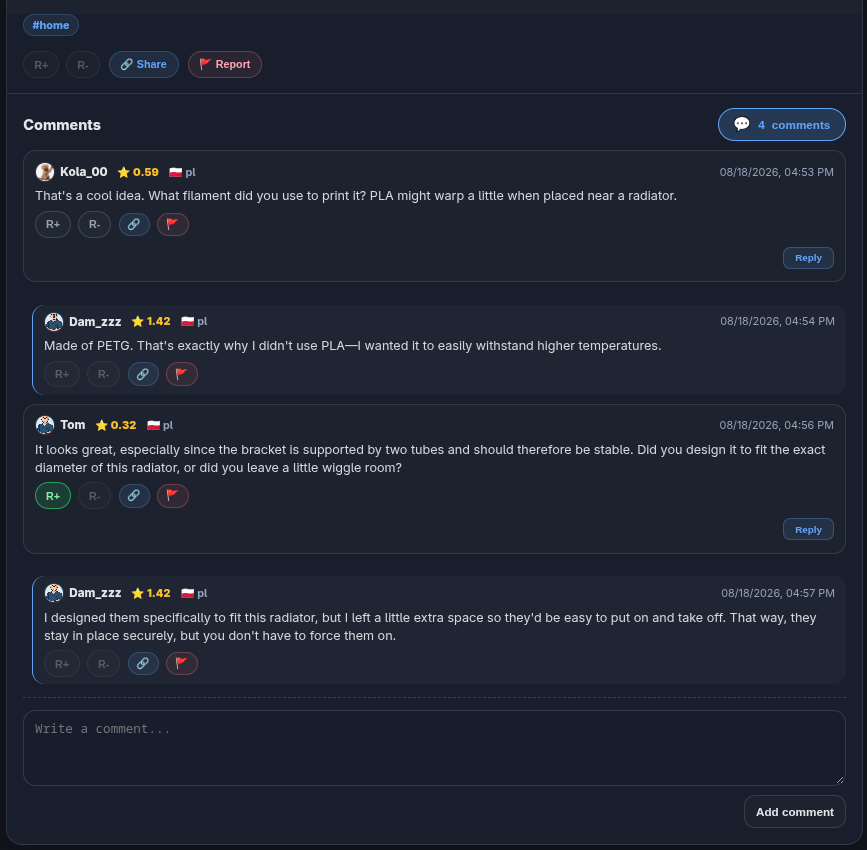
R+ is a positive signal about specific Content.
R− is a negative signal attached to specific Content because of the assessment of that Content.
The effect of a reaction is assigned to the author of that Content in the Post's Category. This means that an R+ or R− on a Comment under a Post in the “Digital & IT” Category affects the Comment author's Reputation specifically in that Category.
Reactions are not used to rate a person “as a whole”. Rate what was published: usefulness, reliability, quality of reasoning, experience, execution or value to others.
The weight of a reaction also depends on the Reputation of the person voting in the relevant Category. A vote from a user who has built a high Reputation in a particular field may carry more weight than a vote from someone who is only beginning their activity in that field.
ReputoNode does not display public R+ and R− counters. The purpose of reactions is to build topic-specific Reputation, not to create a race for likes.
You may give one R+ or R− reaction to the same Content. Once the reaction has been recorded, you do not cast another vote on that Content. Do not rate your own Posts, Comments or Replies.
R− is not a tool for reporting rule violations. If Content violates the Terms of Service or Community Standards, a separate reporting procedure applies.
The “Report” button is available next to Posts, Comments and Replies. It opens a form where you can indicate a violation of the Terms of Service or Community Standards, or report Illegal Content.
5. Reputation is separate for each Category
There is no single global Account score.
On a Profile, Reputation is displayed separately for each Category as a public score from 0.00 to 10.00.
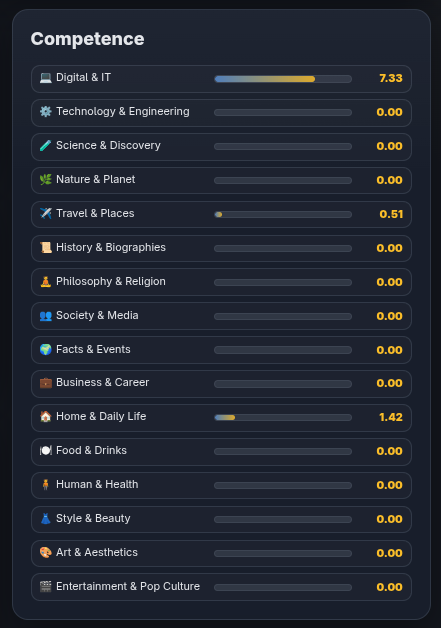
For example, one person may have:
- 8.40 in “Digital & IT”,
- 5.10 in “Technology & Engineering”,
- 1.20 in “Food & Drinks”,
- 0.00 in Categories in which they have not yet built Reputation.
A score of 0.00 does not mean a “bad user”. It may simply mean there is no history of ratings in that field yet.
The score increases with positive Reputation, but it is not a simple sum of reactions. ReputoNode recalculates it so that additional points gradually have a smaller effect on the public score. This keeps the 0.00–10.00 scale readable even when a user has a long history of activity.
The public score is a simplified presentation of Reputation. It does not show the raw number of points and is not a professional certificate, confirmation of qualifications or a guarantee that published information is correct. It is a signal derived from the history of ratings of the user's Content in a specific Category.
6. The Profile shows activity, not popularity
A public Profile may contain an avatar, name, location, bio, selected contact details, activity and Reputation in individual Categories.
You can also follow other users. Following helps you return to authors and Content that interest you, but it is not part of Reputation.
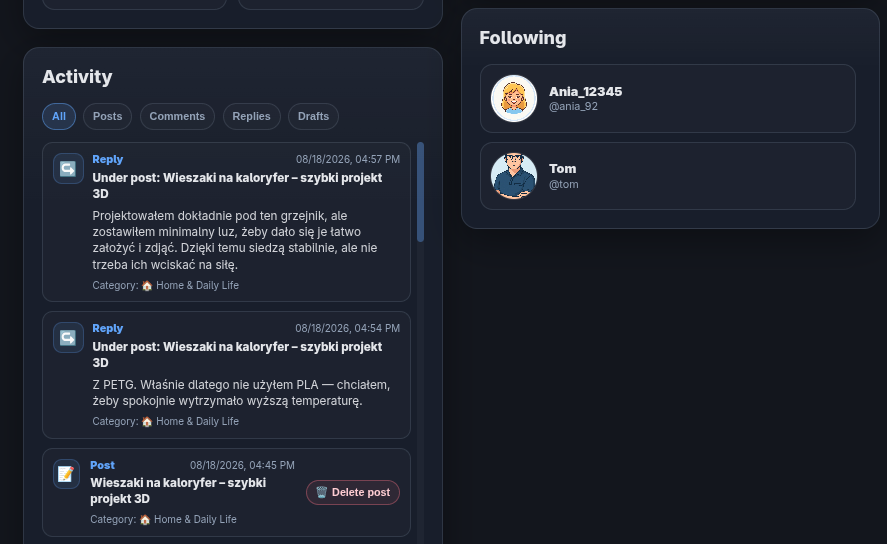
The Profile also includes an activity history: Posts, Comments and Replies. The Account owner can additionally see their own drafts. This allows a person visiting the Profile to check not only the score in a Category, but also the Content on which that Reputation was built.
ReputoNode does not base a Profile on a public follower counter. The Portal does not show the number of followers as a measure of a user's importance. What matters more is the topics in which the user contributes valuable knowledge, experience or well-reasoned statements.
7. Comment substantively
Comments and Replies are part of the Reputation system just like Posts. Discussion therefore matters as well.
You can:
- comment on a Post,
- reply to a Comment,
- rate a Post, Comment or Reply with R+ or R−,
- share a link to a Post or Comment.
Criticise the argument, information or execution — not the person. A difference of opinion alone does not necessarily mean that Content deserves an R−.
In practice, a valuable Comment can build the author's Reputation in its own right, even if the commenter disagrees with the author of the Post. ReputoNode is designed to reward substantive contributions to a discussion, not unanimity.
8. How should you approach your first days on ReputoNode?
You do not have to publish in many Categories right away. Start with an area you genuinely know or are truly interested in.
A good start is to:
- complete your Profile,
- follow a few users who interest you,
- publish one specific Post,
- comment substantively on other people's Content,
- use R+ and R− only when you genuinely want to assess the value of specific Content.
Do not try to “farm” Reputation by publishing a large number of random Posts. The system is designed so that the quality and assessment of Content in a particular field matter.
The most important rule
ReputoNode is intended to promote competence and the value of Content, not popularity for its own sake.
Publish what you contribute to a specific topic. Rate specific Content. Build Reputation where you genuinely have knowledge, experience or valuable things to show.